
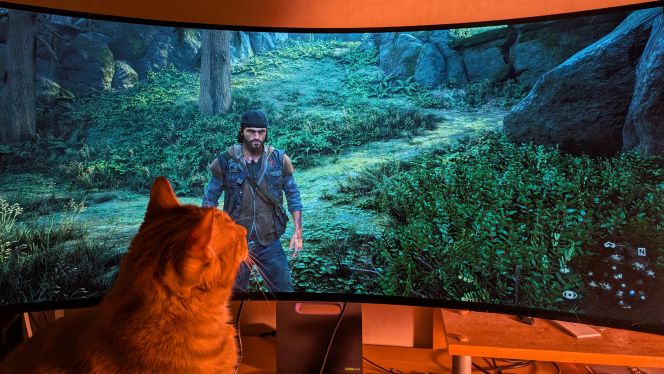
TECH REVIEW – The LG 39GS95QE is a 39-inch, 3440×1440 resolution, 240Hz curved ultrawide gaming monitor built on LG’s W-OLED panel, boasting a dramatic 800R curvature. While the 39GS95QE shines for gaming and movie-watching, its lower pixel density and so-so text sharpness make it less suitable for office work or productivity tasks. Still, there’s a growing demand for ultrawide monitors larger than the usual 34 inches, and the LG UltraGear 39GS95QE-B is among the first OLED models in this class – so let’s see what it’s made of!
Among ultrawide displays, one of the most popular sizes is 38 inches at 3840×1600, which provides the same pixel density as the 34-inch, 3440×1440 crowd, just stretched across a bigger canvas. The LG 39GS95QE, on the other hand, stays with 3440×1440 resolution, resulting in 95.62 PPI – which is basically the same as a 24-inch 1080p or 32-inch 1440p monitor. Details remain fairly crisp, but some users coming from sharper screens may notice the drop in density. Still, compared to the ~81 PPI of a 27-inch FHD or a 45-inch ultrawide, it’s a significant upgrade. Viewed from about 91 cm (36 inches) away, individual pixels are not noticeable, making this a fair trade-off given the size.

Pixel Pairing Problems: The OLED Panel’s Quirks
The bigger questions lurk beneath the surface: LG’s W-OLED panel uses the first-gen RWBG subpixel layout instead of the newer RGWB. This means you’ll get a bit of color fringing on smaller text and fine details – a problem that’s only amplified by the lower pixel density. You probably won’t notice this during gaming or watching videos, but if you’re reading or typing a lot, it can be distracting. And as of now, there aren’t any 38-inch 3840×1600 OLED or mini-LED HDR monitors out there (nor are any in the pipeline), so there’s no real alternative. Think of the 39GS95QE as a 32-inch 2560×1440 monitor with about 30% extra width and a 21:9 aspect ratio – which really pays off in compatible games for a more cinematic, immersive experience. And with movies, those black bars at the top and bottom (a fixture of 16:9 screens) are gone.
Of course, some games – especially competitive ones like Valorant or StarCraft II – simply don’t support ultrawide resolutions, so you’ll see black bars at the sides, just like with 16:9 videos.

Brightness, Colors, and HDR: Visuals Rule Here
The LG 39GS95QE still relies on LG’s W-OLED panel, but it’s had a major boost in brightness: you can hit up to 1300 nits (with less than 3% white window), which delivers truly punchy HDR highlights. Even at 100% white, it pushes 275 nits – more than enough for most everyday scenarios. For context, these are white luminance figures – Samsung’s QD-OLED panels have lower white brightness on paper but offer a wider color space and cover 99.3% of DCI-P3 for even more saturated, vivid colors, so they can look brighter overall. The 39GS95QE covers an excellent 98.5% of DCI-P3, so you still get gorgeous, lively images. For HDR, you get two modes: Peak Brightness Low (which is more accurate but limited to 650 nits) and High (up to 1300 nits, but it can make content look a bit overblown). It would be great if LG could offer a firmware update for bright, accurate HDR at once. Viewing angles are a generous 178°, so you get a perfect picture from anywhere. True 10-bit color depth means you won’t see color banding. The monitor is factory-calibrated and even offers sRGB emulation if you want a tamer color palette for SDR work.
When it comes to performance, it’s a powerhouse: 240Hz max refresh rate, blazing-fast 0.03ms pixel response, so no motion blur, and roughly 3ms input lag. It supports VRR (AMD FreeSync Premium Pro, NVIDIA G-SYNC Compatible, HDMI 2.1 VRR) up to 240FPS, though in some darker scenes you may notice the occasional flicker – which is par for the course on OLED. The main downside of OLED is still the risk of burn-in, but with normal use and features like Screen Move, Screen Saver, and OLED Cleaning, this risk is minimized – and LG even includes a 2-year burn-in warranty. The monitor is completely flicker-free, and there’s a low blue light mode too.

Features and Design: Not Just a Pretty Face
There’s a joystick on the back for snappy menu navigation, or you can use the LG On-Screen Control app on your PC for easy adjustments via keyboard and mouse. Beyond the basics (brightness, contrast), you get manual color temperature in 500K steps, sharpness, three gamma settings, aspect ratios (Full Wide, Original, Just Scan, Cinema 1, Cinema 2), automatic input detection, and even six-axis color controls. Black Stabilizer enhances shadow detail, there’s a refresh rate tracker, a crosshair overlay, Picture in Picture/By Picture, and hardware calibration with on-board profile storage.
The stand is sturdy and offers up to 120mm of height adjustment, -10°/15° tilt, ±10° swivel, and VESA (100x100mm) support. The 800R curve is extremely pronounced, heightening the immersive feel – though it may not be everyone’s cup of tea. The matte, anti-glare finish adds a touch of grain on solid colors but totally eliminates reflections. As for aesthetics: purple accents, a cable management hole, rear RGB lighting, and a quiet, built-in fan. Ports include DisplayPort 1.4 with DSC, two HDMI 2.1 (48 Gbps), a headphone jack with DTS Headphone:X support, two USB 3.0 ports, and if the monitor’s USB cable is connected, you can use the headphone port for a mic too.
| Screen Size | 39 inches |
| Curvature | 800R |
| Resolution | 3440×1440 (UWQHD) |
| Panel Type | OLED |
| Aspect Ratio | 21:9 (UltraWide) |
| Refresh Rate | 240Hz |
| Response Time | 0.03 ms (GtG) |
| Adaptive Sync | FreeSync Premium Pro (48-240Hz), G-SYNC Compatible, HDMI 2.1 VRR |
| Ports | DisplayPort 1.4, 2× HDMI 2.1 (48 Gbps) |
| Other Ports | Headphone jack, 2× USB 3.0 |
| Brightness (1–3% white window) | 1300 cd/m² |
| Brightness (10% white window) | 800 cd/m² |
| Brightness (100% white window) | 275 cd/m² |
| Contrast Ratio | Infinite |
| Colors | 1.07 billion (true 10-bit), 98.5% DCI-P3 |
| HDR | VESA DisplayHDR 400 True Black |
| VESA | Yes (100×100mm) |

Weighing It Up: Dream Gaming Display or Trade-Off?
The LG 39GS95QE is a rare breed: it’s fantastic for gaming, watching movies, and creative hobbies if you can live with the pixel density trade-off and don’t need it for text-heavy office work. HDR is impressive, colors are superb, response times are top-notch, and it’s loaded with features – all wrapped up in a premium design. You do need to watch out for burn-in, especially with lots of static content, but LG’s warranty and anti-burn-in tech provide peace of mind. The price is steep, but if you want a standout gaming monitor in the 39-inch ultrawide OLED category, this one is hard to beat right now.
Bottom Line: Who Should Buy It?
The LG 39GS95QE is a unique OLED gaming monitor that asks for some compromises but rewards you with a spectacular experience for gaming and movies. If pixel density isn’t your top priority and you’re not scared off by potential burn-in, this LG flagship will impress. Its HDR, colors, and features set it apart, though its premium price means it’s not for everyone. For those seeking the best ultrawide OLED experience, this is currently the top contender. This monitor is designed for hardcore gamers and cinephiles – if you want an office display, look elsewhere! The LG 39GS95QE delivers outstanding OLED visuals, HDR, colors, and extras, though mostly for those who know what they’re getting into.
-Herpai Gergely (BadSector)-
Pros:
+ Instantaneous response time, low input lag, VRR up to 240Hz
+ Infinite contrast ratio, wide color gamut, high peak brightness
+ Plenty of useful features, VRR to 240Hz, hardware calibration
Cons:
– Risk of burn-in
– Text clarity issues due to the uncommon subpixel layout
– Expensive
LG 39GS95QE OLED gamer monitor
Design - 8.4
Picture quality (gaming) - 9.4
Picture quality (office work) - 7.6
Hardware - 8.1
Price/value - 7.8
8.3
EXCELLENT
The LG 39GS95QE is an ultrawide OLED gaming monitor that stands out for its exceptional image quality, vibrant colors, and feature set, even if it comes with some compromises on pixel density. It’s best suited for gamers and movie enthusiasts willing to accept a higher price and the inherent risk of burn-in. This premium display delivers a truly spectacular visual experience—but it’s not for everyone.










Leave a Reply