
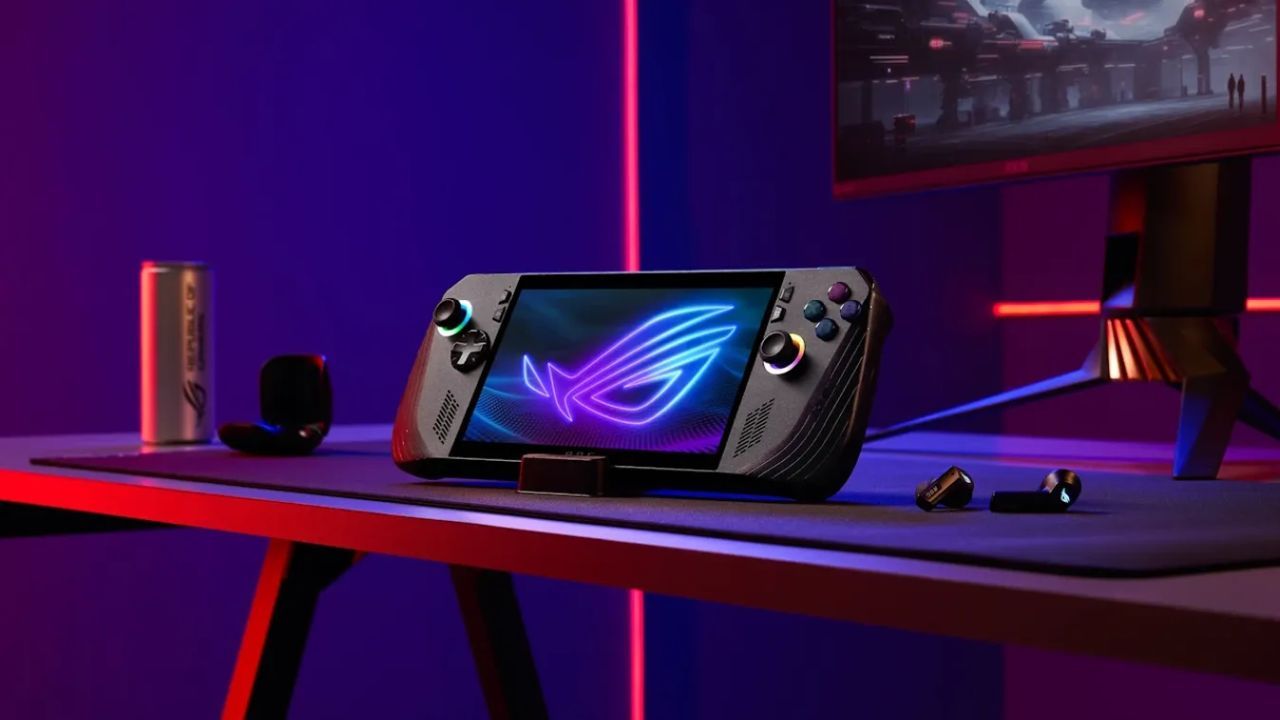
TECH REVIEW – Microsoft keeps telling us that anything with an Xbox logo is an Xbox, whether it is a console, a PC, a phone or even a VR headset, but the ROG Xbox Ally X is really a compact gaming PC dressed up in Xbox colors. The marketing sells you the fantasy of a simple living room console you can hold in your hands, while in reality you are moving in with a surprisingly friendly, but still very moody Windows machine that behaves like a handheld console maybe 80 percent of the time. The remaining 20 percent of the experience is there to remind you, sometimes very bluntly, that this is still a PC, only more expensive and much closer to your face.
Microsoft has been repeating the same mantra for years, that whatever they call Xbox is in fact an Xbox – whether it is a traditional console, a gaming PC, a phone or a VR device. The ROG Xbox Ally X slips neatly into that story: on paper it is an “Xbox”, in practice it is a surprisingly powerful handheld gaming computer that has been squeezed into a console-like shell. Underneath the plastic there is a full Windows system, on top of which Asus and Microsoft have bolted a console-style interface, so at first glance it feels like a “grab it, start it, play” kind of device. If you only look at it quickly, you could easily believe it is a portable Xbox, but anyone who has seen a desktop in their life will spot the costume sooner or later.
The beating heart of the Ally X is the PC side of the Xbox ecosystem: the handheld runs Windows 11 and the Xbox (PC) store and Game Pass (PC) client sit on top of it, so you can literally pocket the Microsoft subscription catalog. The story does not stop there, though, because all the usual PC stores are lined up next to it: Steam, Epic Games Store, EA, Ubisoft, GOG, Battle.net, and pretty much every platform you would use on a normal gaming PC. If you feel like it, you just hook up a keyboard, mouse and monitor, and the Ally X instantly shapeshifts into a “real” desktop, hanging from a dock or cable like a very small gaming tower.
If you found the Steam Deck a bit too much like a small Linux PC and not enough like a console, you should temper your expectations here. The Ally X absolutely moves the needle toward a console-style user experience in the Windows world, but it does not erase the PC layer completely. On the surface it plays the role of an Xbox quite well, but deep down you can still sense the registry, the installer windows and the app updates lurking everywhere.
I also happen to be deeply tied into the Xbox world: the main machine in our living room is an Xbox Series X, that is our primary Game Pass device, and for the past two decades there has basically always been an “actual” Xbox under the TV. With the exception of the first, underwhelming half of the Xbox One generation, I have stayed on board for every era, and I own a small fortune’s worth of games in the Microsoft ecosystem. I am not testing this as someone peeking in from the outside at “how Xbox works”, but as someone who uses a couch-based console every day, and expects the Ally X to measure up if it dares to carry the Xbox name.

Handheld Xbox on the Surface, Windows Behind the Curtain
The sense of “this is really an Xbox” on the Ally X is built mainly on the new full screen Xbox experience. This mode hides most of Windows and presents a slimmed down, handheld-friendly Xbox interface, where the focus stays on your games and the Game Pass library. Think of it as similar to Steam’s Big Picture mode or the Steam Deck interface, just a little less polished, where some seams are still visible if you look closely.
When everything behaves, the Ally X genuinely feels like a dedicated Xbox handheld: you sign in with your Xbox account, install your Game Pass titles, and the interface remains familiar at every step. Problems start when Windows decides it also wants to speak up, and suddenly a system notification or installer window pops up in front of you, ripping the console illusion to pieces. These moments make it crystal clear that the “console experience” is just a layer on top of a full Windows PC, not a replacement for it.
The situation gets even more tangled once you bring in Xbox’s Play Anywhere program, which on paper is a fantastic promise: you buy a game once in the Xbox ecosystem and you can play it on console, PC or via cloud, wherever you happen to be. In theory this sounds like it was made for devices like the Ally X, in practice the picture is more mixed. Play Anywhere support is far from universal, the PC and console stores do not always share the same catalog, and it is up to the player to read the small print before they realize, too late, that half of their collection will not run natively here.
To be fair, Xbox does clearly label which games support Play Anywhere, but if you walk into a shop, grab a ROG Xbox Ally X and walk out under the impression that “all my Xbox games are coming with me”, there is a good chance you will get a rude awakening. This handheld leans very heavily on the strength of the Xbox brand, which is why Microsoft should be doing a better job of making sure that behind the marketing buzzwords there is a consistently good experience.

When the Xbox Mask Slips
A great example of those limits are CD Projekt Red’s two flagships, The Witcher 3 and Cyberpunk 2077. I own both of them on Xbox, they live happily on my Series X, yet I simply cannot run them natively on the Ally X. Neither title is available in the Xbox PC store and neither is a Play Anywhere game, which means my only options are cloud streaming or buying them again in one of the PC stores. For a handheld that is supposed to be all about on-the-go play, that is a pretty big compromise, and cloud gaming is not always a realistic option anyway.
From a marketing perspective, calling something an Xbox while only giving you partial native access to your library is walking on thin ice. If you are serious about the Ally X becoming your “one Xbox for everything”, you really have to check in advance what is actually available on PC and what will remain tied to your living room console. The titles you can not run end up quietly pushing you toward the competing storefronts: suddenly you are browsing Steam, Epic, GOG and the rest, and at that point you are no longer using an Xbox-centric handheld, but a classic gaming PC that happens to have an Xbox app installed.
Those alternative stores all bring their own clients with them, and on the Ally X they run as full screen apps too. If you fire up the Steam client, you once again get a view that completely covers Windows and pulls you into its own ecosystem. This sounds great until something does not go exactly as planned. I grabbed the Ubisoft Connect app from one of the tiles in the Xbox-style interface, the download was smooth, then nothing seemed to happen at all – until I found a hidden installer window in the background, asking me to choose a language and install folder in classic Windows fashion.
If you grew up on gaming PCs, this is a minor annoyance at best. For someone coming from the plug-and-play world of consoles, though, these little interruptions feel jarring. The “packaged handheld console experience” that was built around the Xbox brand is easily pierced by such moments, and suddenly you feel like you are back at a small gaming laptop where you sometimes have to hunt for installers, close errant apps or dig in the taskbar, instead of just hitting the A button and playing.

Green and Blue Badges – What the Hardware Can Really Handle
Asus does not leave everything to the Xbox app either: the Ally X comes with its own ROG Command Center that floats above Windows and the Xbox layer. The small overlay version is harmless enough, but if you want to tweak things in depth, the Command Center opens full screen and the console act is immediately gone. Updates, drivers and system components are also split between the ROG tools and Windows itself, which from a non-technical user’s perspective can easily feel like juggling three separate systems at once.
Xbox tries to balance this out with its Handheld Compatibility system. Games that receive a green “Handheld Optimised” badge are supposed to be configured in a way that they can run comfortably on the Ally X without any tampering. In theory you just start them and play, there is no need to spend half an hour wandering through options menus in search of the holy grail of smooth performance. For a handheld that wants to feel like a console, this kind of “it just works” experience is crucial, because nothing screams “PC” louder than a long tuning session before every game.
In practice, the system looks promising, but it is not flawless. The green-badged Gears of War: Reloaded ran beautifully on the Ally X, both in performance and visuals, and looked exactly as good as I would hope on a display this size. Indiana Jones and the Great Circle starts at lower default settings, but on a small screen the reduced quality is easier to accept, while the game still feels responsive. South of Midnight looks especially at home on the handheld, its art direction and pacing make a lot of sense in this format.
We will only know how reliable those green labels are after a lot more testing. For now, they are a strong signal that “you probably do not need to worry”, but PC history tells us there will always be edge cases. Valve uses a similar verified system on the Steam Deck to show which games are “Deck ready”, and even there a “Verified” mark has not always guaranteed a flawless experience. It will take time to see whether the Ally X’s handheld badge becomes a true quality seal or remains more of a guideline.

A Big Leap From Steam Deck, a Fine Tune From Z1
The picture gets even more nuanced when you start comparing the Ally X with other handhelds already on the market. For players who have been gaming on a base Steam Deck, the ROG Xbox Ally X is a serious step up: the new RDNA 3.5-based Z2 Extreme APU simply has more headroom than Valve’s older RDNA 2 chip, especially when it comes to cutting edge, demanding titles. Games that barely managed to hold the 30 fps line on the Deck can suddenly become genuinely enjoyable on the Ally X, with far less painful compromise on visuals.
I am not talking about lab grade benchmarking here, but after spending a generous amount of time with it, the difference is obvious. Titles like Avowed, Hellblade 2, Dead Space, Doom: The Dark Ages, Avatar: Frontiers of Pandora or Borderlands 4 either struggle on the Steam Deck, or require such massive visual cuts that they lose a lot of their appeal. On the Ally X it is much easier to find a balance where the frame rate is friendly and the game still looks decent, and you do not have to slam everything down to potato mode just to keep it running.
If you already own a handheld with a Z1 Extreme under the hood – for example the previous generation ROG Ally X or a Legion Go – things are more subtle. Here the Z2 Extreme’s advantage is more in the 15 to 30 percent range, which can be gold in certain titles: pushing a game from the low fifties to a stable 60 fps is something you definitely feel, and a struggling 30 fps title can finally climb into a more comfortable zone. The question is whether that uplift is worth another 300 to 400 pounds or the equivalent for you, especially if you have already invested serious money into your current device.
Looking forward, it is entirely realistic to expect that drivers and software updates will squeeze even more out of the hardware. With a fresh platform you can more or less bank on one or two years of updates that gradually edge performance upward. The real dilemma for buyers is whether they want to pay today for potential gains that will arrive later – do you jump in now and trust that the Ally X will age nicely, or do you rather wait for the next wave of hardware instead.

Not a Cheap Toy, and Still Not a Real Xbox
From a US wallet’s point of view the numbers also speak loudly: the ROG Xbox Ally X lands around $999.99 in the US, while a base Steam Deck LCD 256GB model officially sells for $399. The ROG does deliver much stronger hardware in return, which makes a real difference in modern, technically demanding games, and the 120 Hz VRR capable display is an easy feature to appreciate. Battery life is decent as well: if you crank everything to the max you are looking at about ninety minutes of playtime, but lighter titles can easily stretch beyond six hours on a charge.
What will rub many people the wrong way is the lack of an OLED screen. In this price bracket more and more handhelds are shipping with OLED panels, and once you get used to true blacks, going back to standard LCD can feel like a downgrade. Personally it bothered me less – my own Steam Deck and Switch 2 are both LCD – but anyone coming from an OLED handheld will likely see this as a bitter downgrade. At this level of investment, people are understandably less forgiving when they see signs of cost cutting.
There is no shortage of competition either: you can get similar performance from devices like the Lenovo Legion Go 2 or MSI’s Claw A8. The Legion offers a larger OLED display and more memory, but at a noticeable premium, the Claw goes for a bigger panel as its main selling point, also at a higher price. The ROG’s real trump card is ergonomics: with those Xbox style grips it is easily one of the most comfortable handhelds I have ever held. It is still physically too big to pull out for a quick five minute bus ride session, but if I know I will be playing for a longer stretch on the couch, I would rather pick up the ROG Xbox Ally X than the Steam Deck or even the Switch 2.
The penny pinching shows up in other ways too. At 380,000 forints there is still no proper case included – even the cheaper Steam Deck ships with one – and the cardboard stand in the box feels borderline insulting for a device that wants to live in the high end segment. A dedicated dock is also an extra cost, although if you do not mind a bit of DIY spirit, a USB to HDMI cable and that same cardboard stand can get the job done. If you really want to go all in, there is the ROG XG Mobile (2025) external GPU, which asks around 1,400 pounds and promises performance in the ballpark of a GeForce RTX 5090 Laptop. Pair that with a TV or monitor and you essentially have a tiny, but extremely capable gaming PC.
Xbox or PC – and Does It Even Matter?
Looking ahead, Xbox has one more trick on the roadmap in the form of Automatic Super Resolution, or Auto SR. This feature would use the built in Neural Processing Unit to render games at a lower internal resolution and then scale them up more intelligently on larger displays, so everything looks sharper and cleaner. The catch is that it is not due to arrive until early 2026, so for now it is only a promise hanging over the Ally X’s long term value.
So we come back to the big question: is the ROG Xbox Ally X actually an Xbox, and how much does that label really matter. The answer depends very much on where you are coming from. For someone raised on gaming PCs, the Ally X will feel like a portable gaming laptop with an Xbox sticker and some nice quality of life features on top. For someone moving over from the living room, from a Series X for instance, this will just as often feel like a PC, with little quirks, updates, multiple apps and the occasional dive into settings menus.
To me personally the ROG Xbox Ally X is more of a PC that wants to be an Xbox, not an Xbox that somehow ended up being a PC. The unified, simple console style experience where “every game just runs, end of story” is still missing. What you do get in return is access to all of the major PC stores on one handheld, with your downloaded games collected into a surprisingly usable launcher, which is a huge plus if your brain is wired more like a PC gamer’s. If you care more about PC freedom and options, and see the Xbox app as a nice extra instead of the main event, this machine starts to look a lot like a jackpot.
Only you can decide whether 380,000 forints is a fair price for a handheld that can run new, technically demanding games in a genuinely enjoyable way, because that is roughly the ticket price for this level of performance. For anyone taking their first serious step into the handheld PC world, the Ally X is a very strong starting point. For those coming from an older Z1 Extreme handheld or a thoroughly pushed Steam Deck, it is more of a refinement than a revolution. One thing is certain: the ROG Xbox Ally X is not a pure Xbox handheld, but for a lot of players it will still be a better, more flexible and more powerful companion than any classic console they have been able to take with them so far.
The ROG Xbox Ally X review unit was provided by ASUS Hungary.
-Gergely Herpai “BadSector”-
ROG Xbox Ally X
Design - 8.2
Display - 7.8
Software - 7.5
Battery Life - 8.2
Price/value - 7.2
7.8
GOOD
The ROG Xbox Ally X is a powerful, comfortable handheld PC disguised as a console that feels like a massive upgrade from a Steam Deck, but more like a careful tune up if you already own a Z1 based device. The Xbox experience is impressive in many moments, yet the limits of Play Anywhere, the Windows pop ups and the separate ROG layer constantly remind you that this is not a real console. It is expensive and not OLED, but for anyone who wants to carry full blown PC gaming in their bag, it may still be the most convincing option right now.

![A Modder Has Turned GeForce Now into a High-End Cloud PC! [VIDEO]](https://thegeek.games/wp-content/uploads/2026/08/theGeek-GeForce-Now-cloud-PC-302x180.jpg)







![An ex-Bethesda Dev Says Including More than 1,000 Planets in Starfield Was a Bad Decision! [VIDEO]](https://thegeek.games/wp-content/uploads/2025/09/thegeek-starfield-nagy-1-300x365.png)


![A Modder Has Turned GeForce Now into a High-End Cloud PC! [VIDEO]](https://thegeek.games/wp-content/uploads/2026/08/theGeek-GeForce-Now-cloud-PC-300x365.jpg)
Leave a Reply