
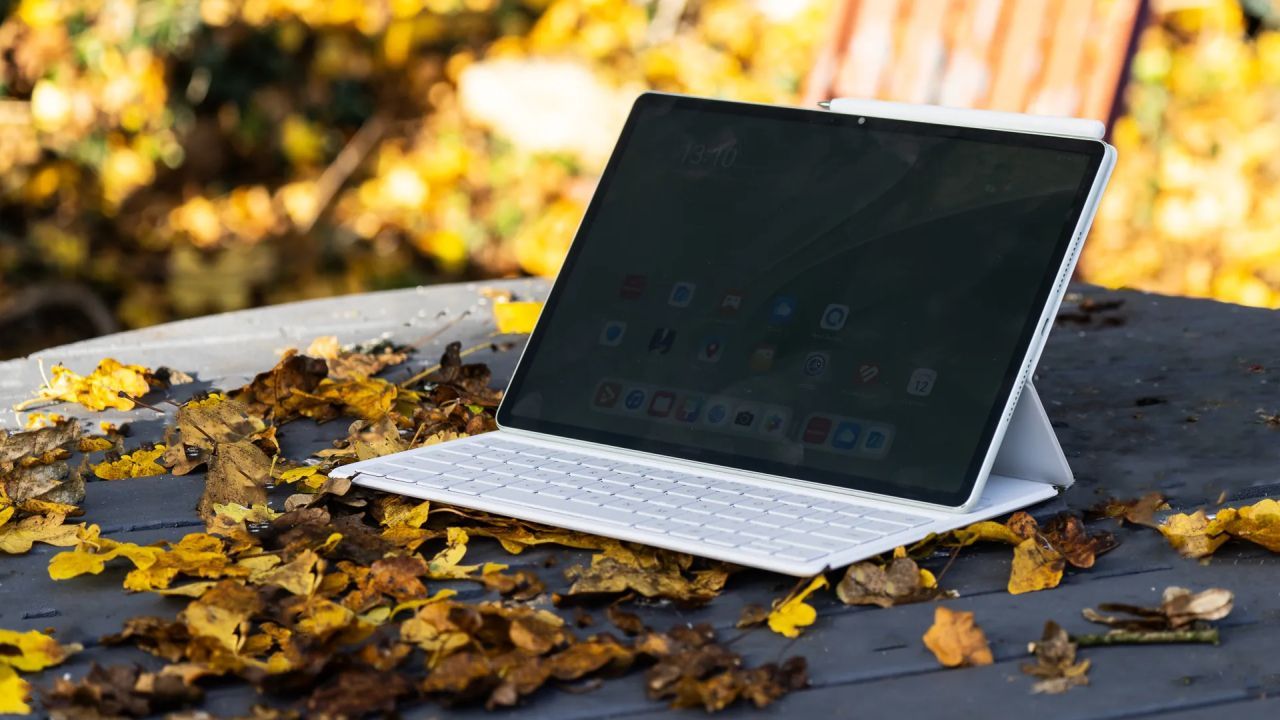
TECH REVIEW – The Huawei MatePad 12 X PaperMatte Edition is the kind of tablet that sells itself first on its matte, paper-like display and drawing-focused marketing rather than on benchmark charts. The review unit we received from Huawei Hungary comes with a Hungarian price tag of roughly HUF 250,000, a keyboard case in the box, M-Pencil support, and a generous promise of “PC-level productivity.” In everyday use, though, it quickly becomes clear that the hardware and the screen easily match the category, while the app selection and the lack of Google services remain the compromise every buyer has to swallow on their own.
In recent years, Huawei has not always made headlines for the right reasons, but in the background it has quietly kept building mobile devices that can easily stand next to the big names in terms of quality, even if their software ecosystem follows very different rules. The MatePad 12 X PaperMatte Edition is priced roughly in the same zone as entry-level iPads, in return you get a low-reflection display that is comfortable for reading, streaming, and drawing alike. The keyboard case and stylus are deeply wired into HarmonyOS, and connectivity is handled by Huawei’s new Nearlink protocol, which in practice is visibly fast and stable. Overall, the MatePad 12 X delivers a good tablet experience, but anyone who is very attached to specific iOS or Android apps should definitely check in advance which ones are available or can be replaced through workarounds.

Key specs before we dive in
Huawei MatePad 12 X PaperMatte Edition – main specs:
• Chipset: Kirin T90A
• RAM: 8 or 12 GB
• Storage: 256 GB
• Operating system: HarmonyOS 4.2 (based on Android 12)
• Display: 12-inch LCD, 2800 x 1840, 144 Hz
• Rear cameras: 12 MP wide, 8 MP ultra-wide
• Connectivity/communication: Nearlink, Wi-Fi 6, Bluetooth 5.2, USB 3.1 Type-C
• Battery: 10,100 mAh
• Dimensions: 270 x 183 x 6 mm
• Weight: 555 g

Paper-like display, familiar shape, new wireless tricks
In the first few minutes of using it, we caught ourselves instinctively trying the iPadOS “swipe up to close” gesture on the MatePad 12 X, which is not just muscle memory, it also shows how familiar the whole design feels. The frame is a bit more rounded, the aspect ratio a bit narrower than on an iPad, but the speakers, buttons, and even the keyboard connector sit in similar locations, so the device as a whole has a faint “Apple déjà vu” aftertaste. The main attraction, however, is on the front: a matte-finished LCD that has been tuned specifically for reading and content consumption.
The panel is not as rough and grainy as a Kindle Paperwhite, but reflections are much more subdued than on a glossy OLED, so the screen does not instantly turn into a mirror in brighter environments. In the hand, it feels nicely balanced, not that ultra-thin, scratch-anxiety type of tablet you are afraid to use without a case, yet it is slim and light enough to be comfortable on the couch, in bed, or on a bus. The stereo speakers on the long edges are very handy for movies and videos, but you will not find a headphone jack here, this is clearly the era of wireless earbuds.
Our review unit came with a magnetic keyboard case that connects to the tablet via Nearlink. Huawei’s new Bluetooth alternative promises a short-range, low-power wireless link that can still reach around 12 Mbps in power-saving mode, several times the speed of classic Bluetooth. On paper, the standard mode can go up to 1.2 Gbps, which feels overkill for a keyboard, but if one day we start throwing large files between devices without using the cloud, it could actually come in handy. For that to happen, other manufacturers would also need to adopt Nearlink, and the MatePad 12 X is the first device we have tested that uses it, so we are still very much at the beginning of that road.
The M-Pencil stylus also communicates with the tablet via Nearlink and snaps magnetically onto the top edge in much the same way the Apple Pencil attaches to an iPad. The software immediately warns you if you place it incorrectly, then recognizes and pairs it, and walks you through a short tutorial on handwriting and drawing basics. The whole process is smooth, the pen feels natural to use, and the matte coating on the display adds just enough resistance to the tip so it does not feel like you are skating on glass.
Under normal circumstances, we measure a tablet’s battery life by locking it in a cabinet and running office workloads and simulated video calls until it dies. HarmonyOS would not run this specific Google Play based test app, but real-world usage still made it easy to get a feel for what it can do. With mixed use – reading, browsing, drawing, some gaming – it easily hits the “take it off the charger in the morning and do not worry until the evening” level. The 10,100 mAh battery pack is clearly not oversized by accident.

App store, workarounds, and a surprisingly good sketchbook
Huawei’s software problem has not disappeared, it has merely changed shape. The company still cannot preinstall the Google Play Store on its devices, even though the base system is still Android at its core. There are workarounds, of course, and you will find plenty of apps in Huawei’s AppGallery, but big names like Chrome (you get Opera or Edge instead, and on the office side there is Office 365, Teams, Outlook), Netflix, or Kindle are missing. To get those, you need to install APKs or resort to various alternative methods. On the plus side, you encounter far less of the overdone AI craze that now permeates everything right down to the notes app on some other mobile operating systems, so if you are tired of that, this platform lets you breathe a little easier.
The app selection is therefore a compromise, but Huawei tries to make up for it on the MatePad 12 X with its own drawing app called GoPaint, which at first glance follows a structure similar to ProCreate. Finished pieces can be exported as PSD, JPG, or PNG files, so you can freely bring them over to other platforms. Put that together with the third generation M-Pencil, which according to the manufacturer is the first tablet stylus capable of distinguishing more than ten thousand pressure levels, and you get a very likable sketchbook where the matte screen coating makes the tip feel much more natural than on shiny glass.
This also means that many of the usual performance benchmark apps are not available in native form. We did manage to wrangle Geekbench and PCMark onto the tablet, but a few tests refused to run, so instead of raw numbers, the overall experience matters more here. In Geekbench, the CPU score lands at roughly half of what Samsung’s pricier Galaxy Tab models deliver, but places the MatePad slightly above the Kindle Fire Max 11, which is cheaper but similarly constrained on the software side.

Mid-range hardware, paper-like display, local price tag
It is not realistic to expect brutal performance from a tablet that sits in the middle of the price range, especially when the character of the display is tuned more for consumption than for professional-grade content creation. In everyday use, however, the system feels responsive, and the optional 8 or 12 GB of RAM is more than enough for multiple parallel apps and opening larger documents. Latency is not on the level of a top flagship phone, but at no point, whether drawing, browsing, or taking notes, did we feel the hardware was holding us back.
The Kirin T90A is an octa-core chip that follows the usual layout: one high-performance prime core, three additional big cores, and four smaller, power-efficient cores handle different workloads. These are Arm Cortex-A510 cores introduced in 2021, and we have seen them in several Snapdragon and Dimensity chips, as well as in Google’s Tensor G3. On paper, the SoC in the MatePad 12 X is not the fastest in the field, but for day-to-day tasks it is not far behind the more recent rivals.
In Hungary, the Huawei MatePad 12 X PaperMatte Edition costs around 249,990 forints in Huawei’s official online store with the keyboard included, which places it in the upper segment of the mid-range. Various Amazon, Kindle, and entry-level Android tablets are cheaper, the basic iPad starts a bit lower, while Galaxy Tabs and iPad Pros push the ceiling much higher. If you look at the package as a whole, with the magnetic keyboard and M-Pencil in the mix, you get a fairly complete system that covers a lot of ground from drawing and note taking to content consumption. The price does not feel outrageous either, as long as you can live with the software limitations.

A good living room companion, but not for everyone
The combination of a matte display and solid performance results in a tablet that is very easy to press into service for many different tasks, especially once your phone screen starts to feel too small for reading or watching movies. It is pleasant to use for note taking, streaming, browsing, flipping through digital magazines, drawing, or playing simpler games, and you may quickly find that when you collapse on the couch, this is the device you reach for by default. The MatePad 12 X becomes a classic “good to have within reach” gadget, and its paper-like display genuinely adds to the experience instead of being just a marketing slogan. The big, but not insurmountable compromise is still the lack of the Google Play Store, so if you do not want to juggle APKs and alternative app stores, this model may fall out of your basket at first glance.
-Gergely Herpai “BadSector”-
HUAWEI MatePad 12 X PaperMatte Edition
Design - 8.4
Hardware - 8.6
Display/Audio - 8.8
User Interface - 7.6
Price/value - 8.2
8.3
EXCELLENT
The Huawei MatePad 12 X PaperMatte Edition is a tablet whose biggest strengths are its matte, paper-like display and drawing-focused accessories rather than raw, “destroy everything” performance. In terms of hardware and battery life, it delivers the kind of solid mid-range foundation you can confidently build work, study, and entertainment on, while the keyboard case and M-Pencil genuinely add useful extra functionality. HarmonyOS and AppGallery, however, still form a compromise-heavy landscape where the lack of Google services can only be eased through workarounds, so the MatePad 12 X is best recommended to those who consciously accept that framework and, in return, appreciate the advantages of the display and the creative features.









![Tom Hardy’s MobLand Is Heading to Blu-ray Before Season 2 Arrives [VIDEO]](https://thegeek.games/wp-content/uploads/2025/05/theGeek-MobLand-1-300x365.jpg)


Leave a Reply