
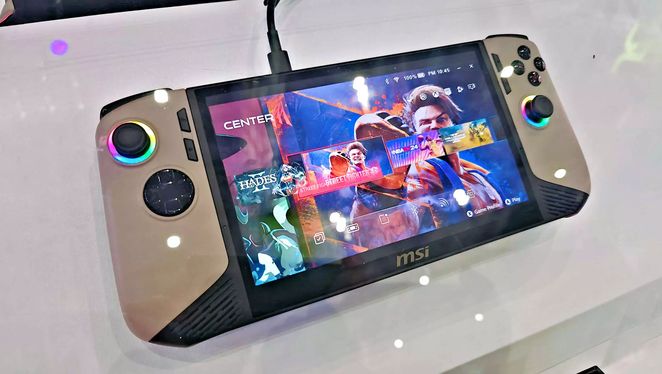
HANDHELD NEWS – The Full Screen Experience (FSE) has only been available on handheld PCs made by Asus and Microsoft until now.
The ROG Xbox Ally and ROG Xbox Ally X boast unique features that set them apart, though neither is particularly inexpensive. The more powerful model is currently the most powerful handheld PC available thanks to its internal components. Its Xbox-style interface adds an extra layer of uniqueness. According to the latest Windows 11 Insider patch notes, this software will begin spreading to other non-Xbox devices, with MSI being the first in line. Starting today, members of the Windows 11 Insider developer or beta channels will be able to enjoy the FSE on MSI Claw devices.
To install it, update to the latest Insider Preview Build version of Windows 11 (KB5067115) and enable FSE in the games section of the settings menu. As the rollout is gradual, the update may not be visible when you start your device, but it should become available within the next few weeks. FSE primarily functions as an overlay for the ROG Xbox Ally and ROG Xbox Ally user interface, bringing Windows devices closer to consoles. It combines games from different stores into one interface and lets you switch screens with the gamepad alone. Since the ROG Xbox Ally does not have a trackpad, being able to control everything with buttons is definitely an advantage.
Another advantage of FSE is that it frees up memory by omitting many basic Windows 11 features. As a result, it runs slightly better than the standard version of Windows 11 on the MSI Claw. According to Windows Update, other OEMs will also roll out FSE over the coming months. Interestingly, making FSE available on any Windows device aligns with Xbox’s latest operating mode. The goal isn’t for everyone to use Xbox; rather, the goal is for Xbox to be available on everything. At the moment of launch, any handheld device can be an Xbox.
That’s also part of the full-screen experience. We can skip the Windows startup entirely and go directly to full-screen mode when we turn on the device.





![[TGA 2025] Tomb Raider: Legacy of Atlantis: Another Remake of the First Game! [VIDEO]](https://thegeek.games/wp-content/uploads/2025/12/theGeek-Tomb-Raider-Catalyst-Legacy-of-Atlantis-Remake-Crystal-Dynamics-302x180.jpg)









Leave a Reply